1
2
3
4
5
6
13
7
8
9
10
11
12
14
15
16
17
18
19
23
20
21
22
24
25
26
31
27
28
29
30
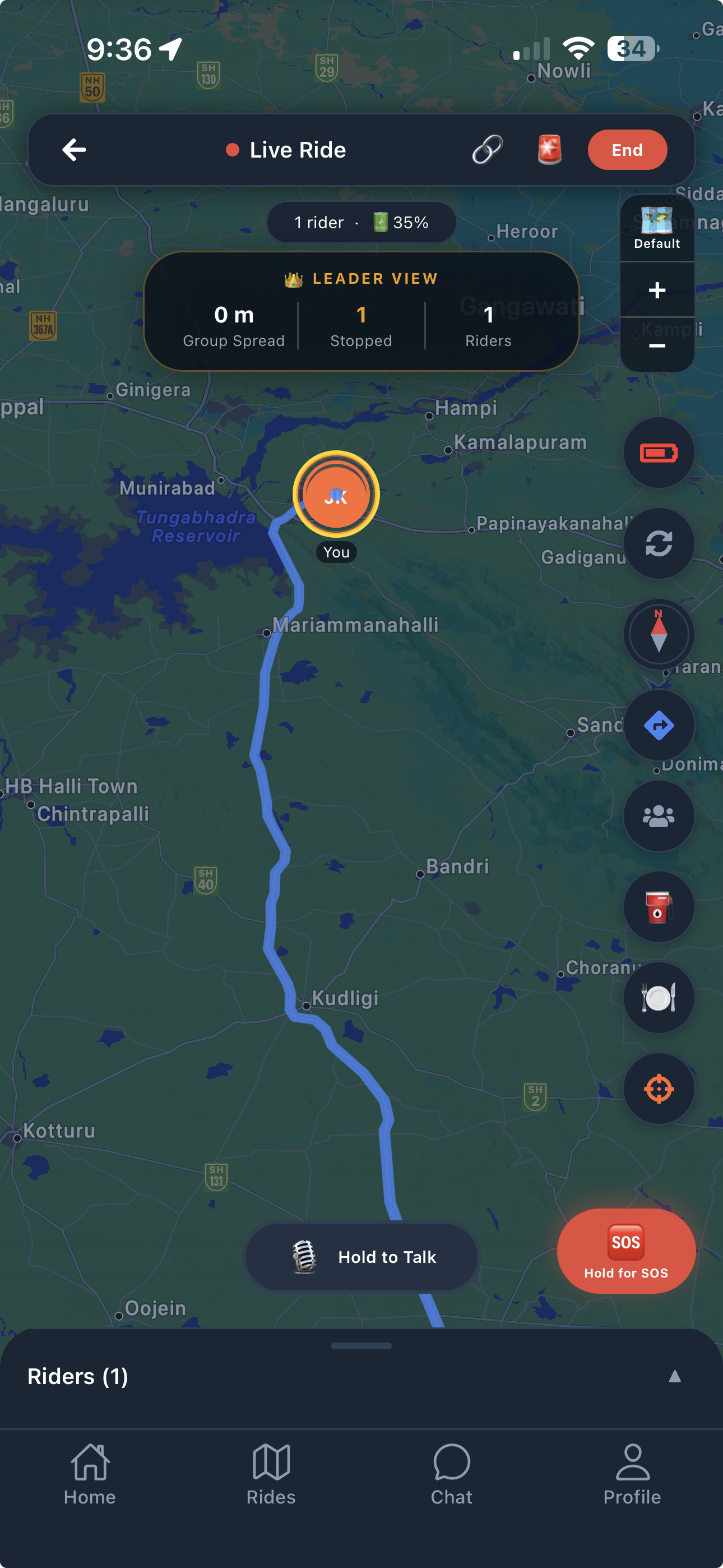
Top Bar
1
← Back
Return to the ride detail screen without ending the ride.
2
🔴 Live Ride
Ride status indicator. Red dot = ride is active and broadcasting live location.
3
🔗 Share Invite
Copy and share the 6-character invite code so new riders can join mid-ride.
4
End (leader only)
Ends the ride for everyone. Shows a post-ride summary with stats for all participants.
5
🔔 Notify Alert
Sends a notification alert to all riders in the group — useful for flagging a stop, hazard, or change of plan.
Status Pills
6
Rider count · Battery
Number of active riders in the group and the leader's current device battery level.
👑 Leader View
7
Group Spread
Maximum distance between any two riders in the group. Helps the leader decide when to slow down or wait.
8
Stopped
Number of riders who are currently stationary (speed ≈ 0). Useful for detecting breakdowns or traffic stops.
9
Riders
Total number of riders actively sharing location in this ride session.
Map Controls (right column)
10
Map Style
Toggle between Default, Satellite, and Terrain map views.
11
+ Zoom In
Zoom in on the map. Pinch gesture also works.
12
− Zoom Out
Zoom out on the map. Pinch gesture also works.
13
🔋 GPS / Battery Mode
Your device's current battery level at a glance. Tap to switch between High Accuracy, Balanced, and Battery Saver GPS modes.
14
Refresh Position
Forces an immediate GPS fix and updates your position on the map.
15
Compass / Heading
Shows your current travel direction. Tap to toggle north-up vs heading-up map orientation.
16
Navigation
Opens turn-by-turn directions to the ride destination in Google Maps or Apple Maps.
17
👥 Riders Panel
Opens the riders list showing each participant's name, speed, battery, and distance from you.
18
⛽ Nearby Fuel
Search for fuel stations within 5 km. Shows a mini-map with Ahead/Behind indicators so you pick a stop that's on your route.
19
🍽️ Nearby Food
Search for restaurants within 5 km — same picker as fuel with Ahead/Behind route context.
23
⊕ Re-centre
Snaps the map back to your current location. Only appears after you pan or drag the map away from your position.
Map Elements
20
📍 Your Location
Your current GPS position on the map, updated every 5–30 seconds depending on your GPS mode setting.
21
🟠 Waypoint Pins
Pit stops added by the leader — fuel stations, restaurants, or custom stops. Tap a pin to see its name and details.
22
Route Polyline
The planned route shown in blue. Automatically recalculates when a pit stop is added mid-ride.
Bottom Controls
24
🎙️ Hold to Talk
Press and hold to broadcast voice to every rider in the group simultaneously — walkie-talkie style.
25
🆘 SOS
Long-press to trigger an emergency alert. Sends your live GPS location via SMS to your emergency contact. Crash detection auto-triggers this if an impact >4g is detected.
26
Riders (N)
Shows how many riders are in the session. Tap to open the full riders panel.
31
⚙️ GPS Settings
Choose between High Accuracy (5 s), Balanced (15 s), or Battery Saver (30 s) GPS update intervals.
Tab Bar
27
🏠 Home
Dashboard with upcoming rides, active ride banner, and quick-join options.
28
🏍️ Rides List
Browse all your past and upcoming rides. Tap any ride to view its details or rejoin.
29
💬 Chat
Group chat for the active ride. Send messages, quick replies, and alerts to all riders.
30
👤 Profile
Your account settings, emergency contact, GPS preferences, and app updates.